Pokémon Pokopia: How to Fast Travel Around the World
Pokémon Pokopia: How to Fast Travel Around the World
Here are all the ways to use fast travel in Pokémon Pokopia, move quickly between areas, and teleport to other locations.
Daniel González · Published: 8 Aug 2026, 13:35
Pokémon Pokopia features several main biomes that you will discover throughout the adventure, and they are all pretty sizeable for the short legs of our human-shaped Ditto protagonist. Fortunately, the game includes a fast travel system for whenever you need to reach different locations quickly. Not sure how it works? Read on, as we explain everything in this entry in our guide.
Fast travel between homes and areas
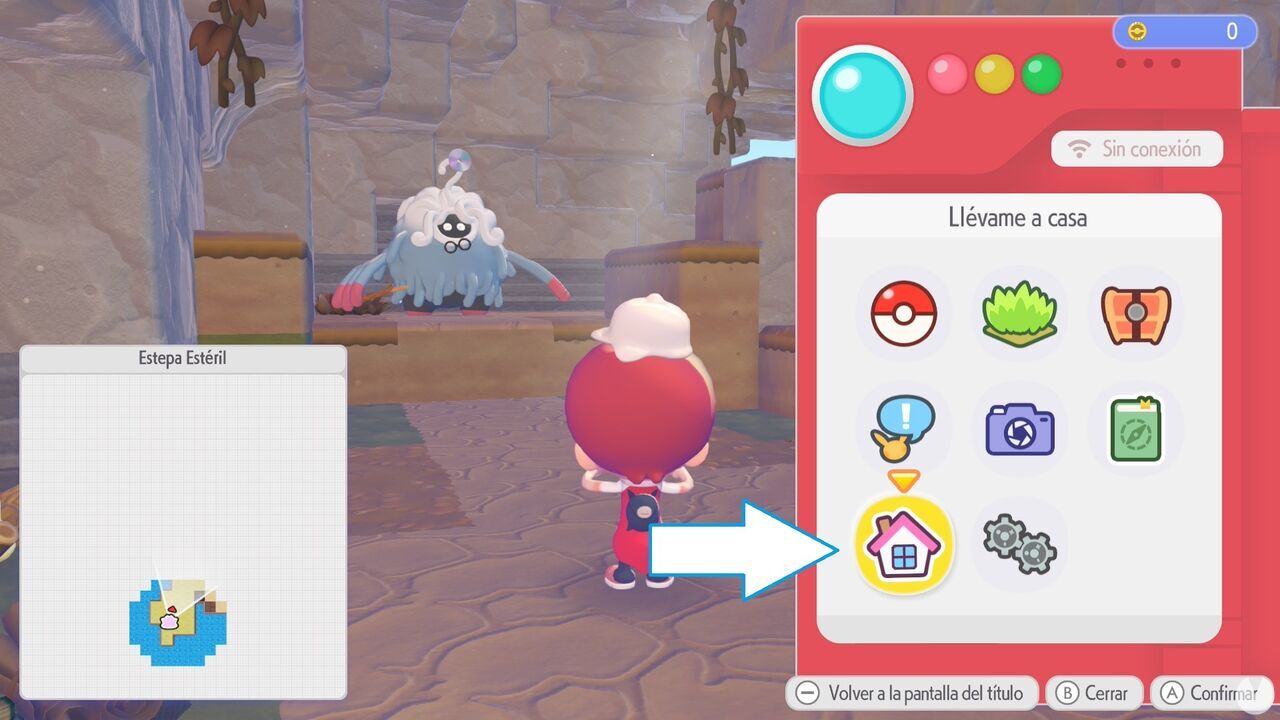
One way to fast travel in Pokémon Pokopia is by using the "Take Me Home" feature, which you can find by opening the main menu. It is the little house-shaped icon highlighted in the following screenshot:
Using this feature allows you to return instantly to your home in any of the available biomes. If you have not yet assigned a home in a biome, it will instead take you to a safe location there, namely the Pokémon Center.
Note: remember that you cannot fast travel to an area from another biome until you have assigned a home there.
This feature is useful both when you want to return home quickly and when you need to switch areas without wasting time walking to the access routes that lead to other islands. You can also use it if you become stuck somewhere and cannot find a way out.
Fast travel to Pokémon locations
Alternatively, you may not know that Pokémon Pokopia features another fast travel system. This one involves using two types of Pokémon Specialties when searching for a particular Pokémon in the world, allowing you to travel directly to its location.
These Specialties are as follows:
Teleport: this Specialty is known by Psychic-type Pokémon such as Abra, Ralts, and Mewtwo.
Fly: this Specialty is known by Flying-type Pokémon such as Pidgey, Hoothoot, Wingull, and Murkrow.
Although they are associated with different types, both Specialties serve the same purpose: you can ask Pokémon that know them to teleport or fly you straight to the location of any Pokémon already living on your island.
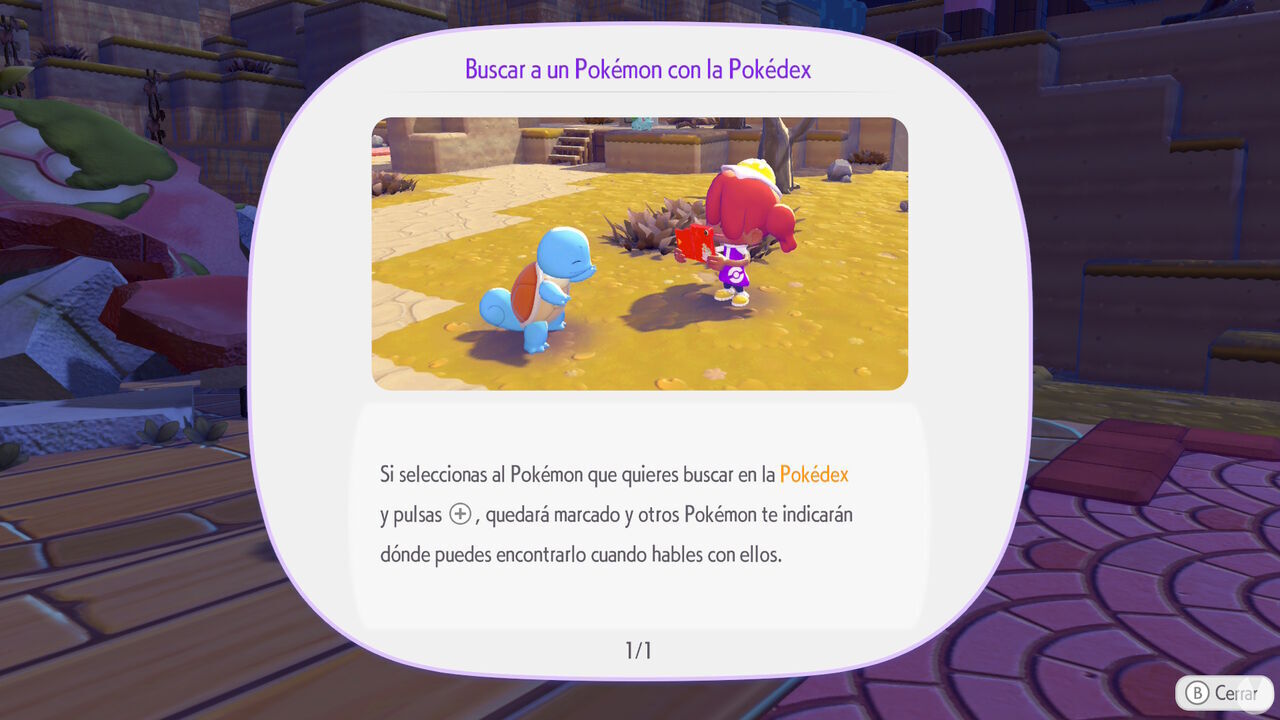
To use these Specialties, simply open the Pokédex, select the Pokémon you want to find, and press the "+" Button. Then talk to a Pokémon with the Teleport or Fly Specialty, and it will take you directly to the chosen Pokémon's location.
This feature can be extremely useful when you need to meet a particular Pokémon or simply want to move around a biome more easily, crossing long distances in just a few seconds. Make sure you take advantage of it!
To create the Mermaid’s Gym habitat in Pokémon Pokopia DLC 1: Bubbly Basin, you need six types of Decorative Poké Balls. Find out where to get them all.
Discover all the new Large Marine Lost Relics available exclusively in Pokémon Pokopia DLC 1: Bubbly Basin, including what they are and how to get them!
Learn how to unlock the Starmie Doll in Pokémon Pokopia DLC 1: Bubbly Basin, visit Basin Dream Island, and discover the materials and secrets hidden there.
Learn the exclusive method to find Phione and register it in the Pokédex, one of the two Mythical Pokémon featured in Bubbly Basin, Pokémon Pokopia’s first DLC.
These are the methods you can use to make Pokémon more comfortable in Pokémon Pokopia, increase their overall Comfort Level, and improve your Environment Quality.
Wondering whether Pokémon Pokopia is also playable on the original Nintendo Switch? Here, we explain whether the game is a Switch 2 exclusive and cover all the details.
A download card confirms that Pokémon Pokopia, the new life sim set in the Pokémon universe, won't take up much storage space on Switch 2 despite launching on a game-key card.
Discover all the redeemable codes and free gifts available in Pokémon Pokopia that you can claim in your game for special rewards via the Mystery Gift feature.
Discover all the details about Pokémon Pokopia’s special Jirachi event, including its dates and times, how to get this Mythical Pokémon, its habitat, item sets, and how to complete wishes.
Discover all the details about Pokémon Pokopia’s special Sableye event, including its dates and times, how to get Sableye, its habitat, unique shop items, and more.
Discover all the details about Pokémon Pokopia's More Spores for Hoppip event, including its dates and times, exclusive Pokémon, unique item set, and more.
Discover all the special bonuses and beneficial effects you can activate by offering different foods to Mosslax in Pokémon Pokopia and using its Eat Specialty.
Check out the complete list of foods and edible ingredients available in Pokémon Pokopia, their associated flavors, and which Pokémon species prefer each one.
Check out the complete list of food recipes in Pokémon Pokopia, all available ingredients, how to cook every dish, and the beneficial effects they provide.