
Can You Play Pokémon Pokopia on Nintendo Switch 1?
Wondering whether Pokémon Pokopia is also playable on the original Nintendo Switch? Here, we explain whether the game is a Switch 2 exclusive and cover all the details.
Daniel González · Published: 8 Aug 2026, 13:12
Pokémon Pokopia is now available worldwide on Switch 2. However, although the game has been promoted as the first fully exclusive title in Game Freak's franchise for Nintendo's new hybrid console, many players are still wondering whether there is a version for the original Switch or whether there is any way to play this simulation adventure on Nintendo's previous console. Surprisingly, it is possible! If you haven't heard about this or still have questions, keep reading this entry in our guide, as we reveal all the details below.
Is there a Nintendo Switch 1 version of Pokémon Pokopia?
If you don't own a Nintendo Switch 2 and would like to play Pokémon Pokopia, unfortunately, the game is not available on Nintendo Switch 1. This means there is no official version of the game that you can purchase from retailers or the Nintendo eShop for Nintendo's original hybrid console.
The game is a Switch 2 exclusive from start to finish and cannot run natively on Switch 1. As far as we know, Nintendo also has no plans to release a Switch 1 version in the future. However, there is actually a way to play Pokopia from a Switch 1 if you meet one specific requirement. We explain how below.
How to play Pokémon Pokopia from a Switch 1
Technically, it is possible to play Pokémon Pokopia from a Nintendo Switch 1 even though the game was never released for that console. The only way to do so is if one of your friends owns a Switch 2 and a copy of the game.
Just like in Donkey Kong Bananza and Mario Tennis Fever, two other Switch 2 exclusives, Pokémon Pokopia players can invite friends to play cooperatively through the Switch 2's GameShare feature.
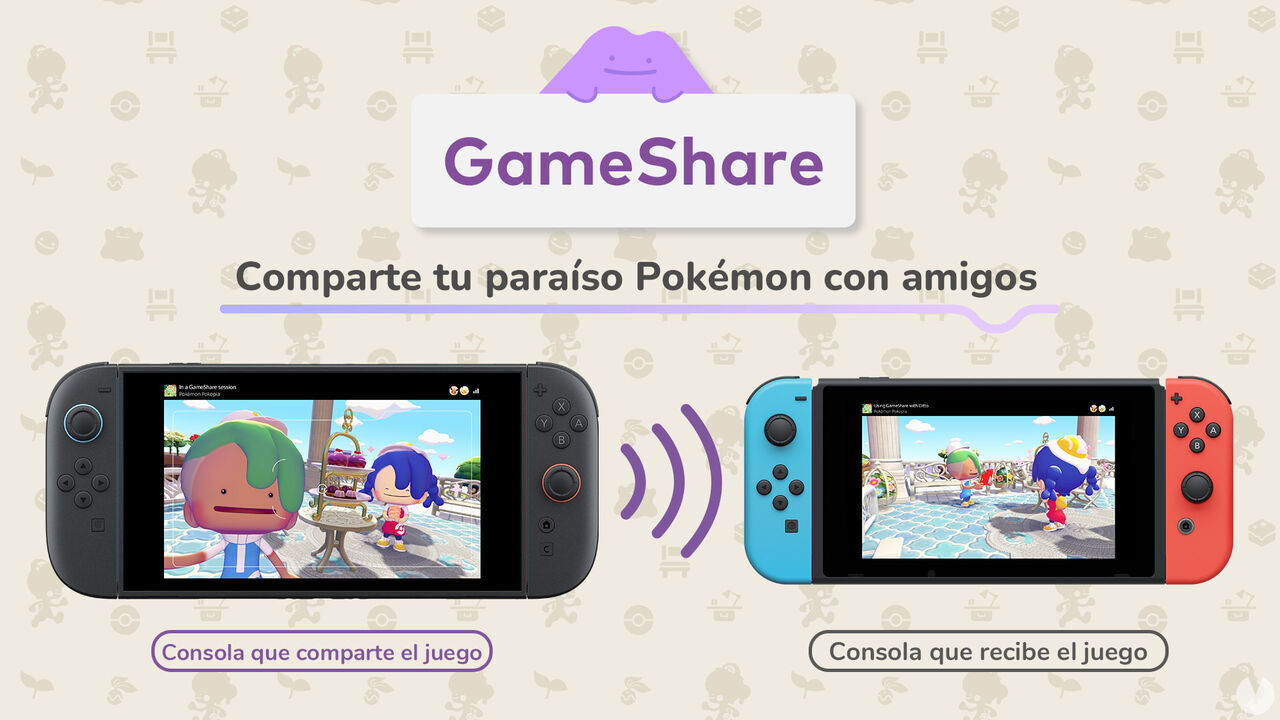
This feature, which forms part of the game's multiplayer, lets users who are physically nearby play cooperatively over the same local network using just one copy of the game. In other words, you won't need to purchase the game yourself.
To use GameShare, follow these steps:
One of your friends must own a Switch 2 and a copy of the game.
You must have a Switch 1 of any model: standard, OLED, or Lite.
Your friend must load their game and create a multiplayer session through GameShare to invite you.
The session is established through a local wireless connection, so you must be physically together and connected to the same Wi-Fi network.
As long as you remain close to each other and the session stays active, you'll be able to enjoy Pokémon Pokopia from a Switch 1.
Limitations when playing through GameShare
Playing Pokémon Pokopia from a Switch 1 through GameShare naturally comes with some limitations. It is important to keep the following points in mind:
When playing through GameShare, you always join the host's game as a guest, meaning you cannot play through your own game from beginning to end.
li>
You can also only play this way in the Withered Wastelands.
Any progress you make is not saved for you, although you can help the other player complete missions or customize their world, with access to all the same tools.
Bear in mind that the player using the Switch 2 cannot use mouse mode.
GameShare sessions in Pokémon Pokopia are also limited to a maximum of just two players at the same time.
Neither console needs an active Nintendo Switch Online subscription to use this feature, as it is available for free.
As you can see, while GameShare on Switch 1 doesn't let you experience everything Pokémon Pokopia has to offer, it is still worth knowing that you can use it to try the game without purchasing it or owning a Switch 2. Now you know how.
To create the Mermaid’s Gym habitat in Pokémon Pokopia DLC 1: Bubbly Basin, you need six types of Decorative Poké Balls. Find out where to get them all.
Discover all the new Large Marine Lost Relics available exclusively in Pokémon Pokopia DLC 1: Bubbly Basin, including what they are and how to get them!
Learn how to unlock the Starmie Doll in Pokémon Pokopia DLC 1: Bubbly Basin, visit Basin Dream Island, and discover the materials and secrets hidden there.
Learn the exclusive method to find Phione and register it in the Pokédex, one of the two Mythical Pokémon featured in Bubbly Basin, Pokémon Pokopia’s first DLC.
These are the methods you can use to make Pokémon more comfortable in Pokémon Pokopia, increase their overall Comfort Level, and improve your Environment Quality.
A download card confirms that Pokémon Pokopia, the new life sim set in the Pokémon universe, won't take up much storage space on Switch 2 despite launching on a game-key card.
Discover all the redeemable codes and free gifts available in Pokémon Pokopia that you can claim in your game for special rewards via the Mystery Gift feature.
Discover all the details about Pokémon Pokopia’s special Jirachi event, including its dates and times, how to get this Mythical Pokémon, its habitat, item sets, and how to complete wishes.
Discover all the details about Pokémon Pokopia’s special Sableye event, including its dates and times, how to get Sableye, its habitat, unique shop items, and more.
Discover all the details about Pokémon Pokopia's More Spores for Hoppip event, including its dates and times, exclusive Pokémon, unique item set, and more.
Discover all the special bonuses and beneficial effects you can activate by offering different foods to Mosslax in Pokémon Pokopia and using its Eat Specialty.
Check out the complete list of foods and edible ingredients available in Pokémon Pokopia, their associated flavors, and which Pokémon species prefer each one.
Check out the complete list of food recipes in Pokémon Pokopia, all available ingredients, how to cook every dish, and the beneficial effects they provide.