
You may also be interested in:
Although Pokémon Champions is a free-to-play game designed for Nintendo Switch consoles and mobile devices, you may want to play it on your computer and be wondering whether there is a PC-compatible version. There is no official PC version of the game, but you can still enjoy its competitive battles on a computer thanks to a well-known and completely legal emulation program.
We are talking about BlueStacks, an app that lets you run Android games on Windows PCs and even Macs. Want to know how it works? Keep reading, as this section of our guide explains how to download and play Pokémon Champions on a computer.
As we have previously explained for other popular free-to-play mobile games, BlueStacks is a fantastic option if you want to play Pokémon Champions on your computer. The process is straightforward and completely legal, so you will not be banned or suspended for playing this way, since BlueStacks essentially simulates a mobile device on your computer.
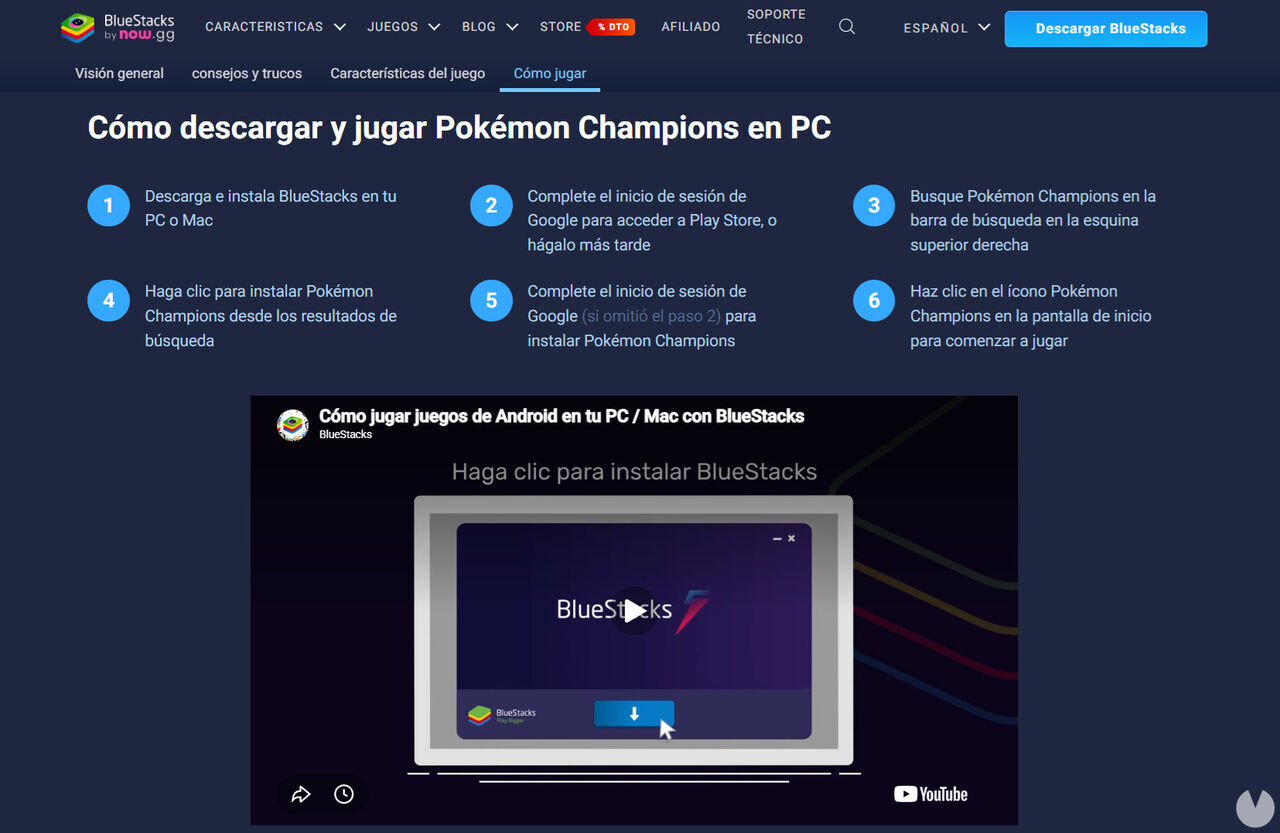
The emulator is compatible with both Windows and macOS and also lets you use a keyboard and mouse as your main controls instead of a mobile touchscreen. If you do not already have it, you will need to download and install it on your computer. Do not worry, though: it is free and can be set up in just a few steps, as explained below:
Once the game has been installed, simply click the "Open" button on the "My Games" page to launch it. The emulator will start everything and configure the controls automatically, although you can customize them however you like and even create macros. Once inside the game, you will need to create a Nintendo-linked account or use one you already have. If you already have an account with progress in Pokémon Champions, you can pick up where you left off and keep your existing Pokémon teams.
For the best possible compatibility, we recommend creating an Android 13 instance in BlueStacks before installing Pokémon Champions. You can do this through the BlueStacks Multi-Instance Manager.
If you have a Mac, remember to download BlueStacks Air, the version specifically designed for macOS. If you have any questions about the process, you can visit this official BlueStacks blog post explaining how to play Pokémon Champions on PC and Mac. Fortunately, all the steps are fairly clear and intuitive.
Remember that your computer must meet the following minimum requirements to install BlueStacks and run Pokémon Champions properly:
Unfortunately, no. Pokémon Champions is not officially or natively available for PC. Nintendo and Game Freak have not released a version for computers. Therefore, the only legal way to play the game on PC is through an emulator like the one explained above.
It is important to stress that any program or website claiming to offer an official PC version of Pokémon Champions is actually FAKE. You should stay well away from these downloads, as they are likely to contain viruses or Trojans that could cause serious problems.
At the time of writing, no PC version of Pokémon Champions has been announced, so keep that in mind.
